 Mergeline
How to mail merge from Excel or a CSV file into Gmail
Updated October 29, 2026
Save your list as an .xlsx or .csv file with an Email column and one column per detail. Gmail cannot read Excel directly, so either upload the file to Google Sheets first or use a tool that reads it. Mergeline accepts a dropped CSV or Excel file and turns each column into a merge tag.
Why Excel and Gmail don’t talk
The classic Excel mail merge runs through Word and Outlook. If your email is in Gmail, that route does not help: Word wants to send through a desktop mail program, and many people do not have one.
So people ask some version of “how do I mail merge from Excel to Gmail” (r/excel: Google mail merge explained simply). You have two honest choices: move the data into Google Sheets, or use a Gmail tool that reads the file itself.
Clean the file before you import
Spreadsheets exported from other systems carry junk that shows up in emails. Fix these first.
- One header row only. Delete titles, merged cells and notes above the headers.
- Short header names with no line breaks: Email, FirstName, Company.
- Dates as text. Excel may turn “March 5” into a serial number like 45356. Format the column as text, or type it as you want it to read.
- Numbers with currency or leading zeros, like ZIP codes, also as text.
- Names in their own column. Split “Doe, Jane” into FirstName and LastName.
- No hidden rows or filtered views you forgot about.
How to mail merge an Excel or CSV file with Mergeline
- Save the file. In Excel, use File, Save As and pick Excel Workbook or CSV UTF-8.
- Drop it into Mergeline. Start a campaign and drag the file onto the list step, or click to browse for it.
- Confirm the email column. Mergeline picks the column named Email, E-mail or Email address. Rename yours if it is called something else.
- Write with tags. Click a column name to insert its tag, like {{FirstName|there}} or {{InvoiceNumber}}.
- Check the previews. Look for numbers that turned into dates and names with odd symbols. Fix them in the file and import it again if needed.
- Send and export. Press send. When it finishes, export the report as a CSV to bring results back into Excel.
CSV or Excel: which to use
| Format | Good for | Watch out for |
|---|---|---|
| .xlsx | Files straight from Excel, with formatting kept | Only the first sheet is used by most tools |
| .csv (UTF-8) | Exports from CRMs, forms and other apps | Accents break if the file is not saved as UTF-8 |
| Google Sheets | Lists several people edit | Built-in Gmail merge reads the first tab only |
If names like “Zoë” turn into odd symbols, save the CSV again as “CSV UTF-8” in Excel and import it again.
Option 1: upload to Google Sheets
In Google Drive, upload the file and open it with Google Sheets. Check that dates and numbers survived the trip. From here you can use Gmail’s built-in mail merge if your Workspace plan has it, or any tool that reads Sheets.
This route is fine for one send. It gets clumsy when the list changes every week, because you have to re-upload and check it each time. Read mail merge from Google Sheets to Gmail for that path.
Option 2: import the file directly
Mergeline reads CSV and Excel files in your browser. The file is not uploaded anywhere: it is parsed on your computer, and the list stays in the browser’s storage. That matters if the file holds client or donor data you should not hand to another company.
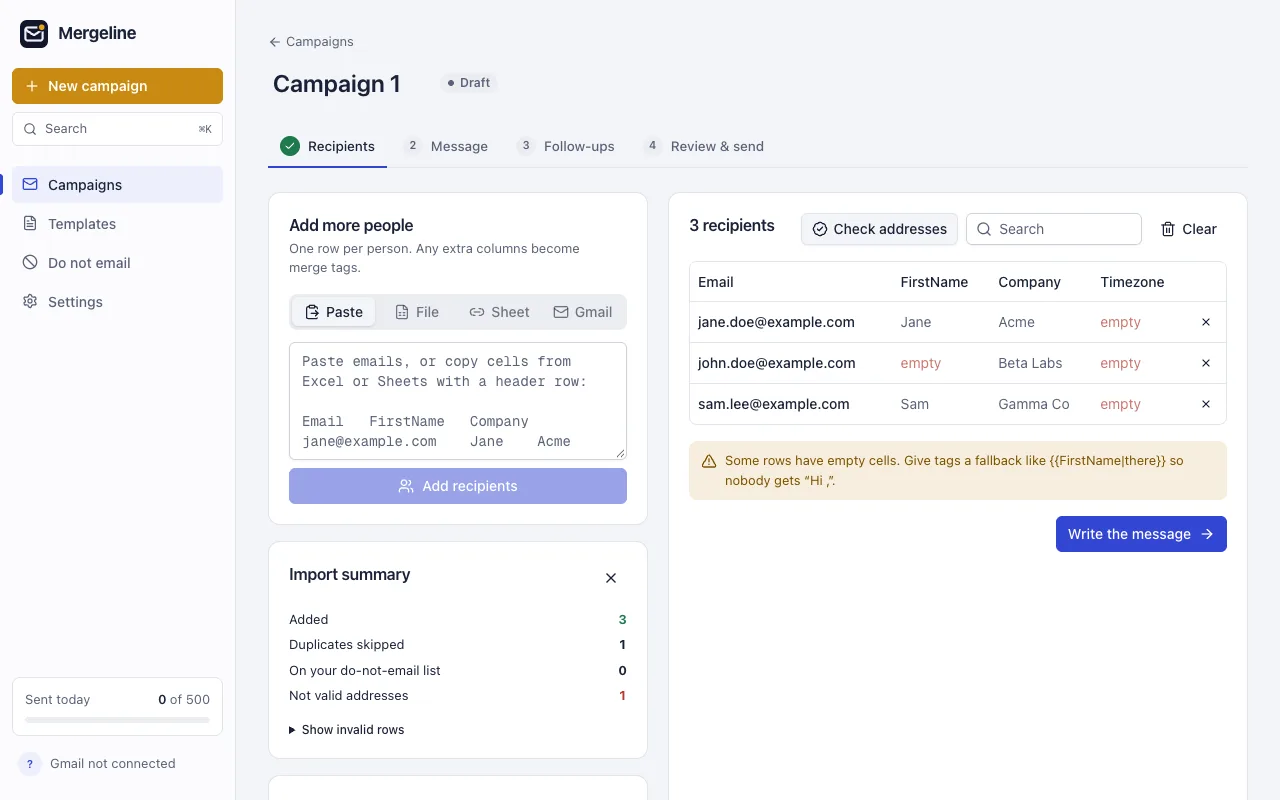
After import you see how many rows were kept, how many were duplicates and how many addresses were invalid. The “Check addresses” button can also look up whether each email domain exists, so typos like example.con get caught before they bounce.
Common import problems
- Only some rows imported. Rows with no email, or an address that is not valid, are skipped. The import summary tells you how many.
- Two addresses in one cell. Split them into separate rows, one person per row, or keep only the main contact.
- A column you need is missing. Most tools read the first sheet of a workbook only. Move the list to the first sheet, or save that sheet as a CSV.
- Leading zeros vanished. ZIP codes and phone numbers lose zeros when Excel treats them as numbers. Format the column as text before you type.
- Names in capitals. Exports from old systems often shout: “JANE DOE”. Fix the case with Excel’s PROPER function before you import.
Keep a copy of the cleaned file. Next time you export from the same system, you will know which fixes it needs.
Questions
Can Gmail open an Excel file for mail merge?
Not directly. Gmail’s built-in mail merge takes contacts or a Google Sheet. Upload the Excel file to Sheets first, or use an extension that reads the file.
Do I need Outlook or Word?
No. Word and Outlook are one way to merge from Excel, but you can send from Gmail with a Gmail tool and skip both.
Why do my dates show as numbers?
Excel stores dates as serial numbers. Format the column as text, or retype the dates the way you want them to read, then save again.
Is my file uploaded to Mergeline’s servers?
No. The file is read in your browser and the list stays there. See the security page.
How large a file can I use?
There is no fixed row limit for the import, but Gmail’s daily limit still applies: about 500 a day on a free account (Google: Gmail sending limits).
Sources
- r/excel: Google mail merge explained simply
- Google: Gmail sending limits
- Google: Send personalized emails with mail merge in Gmail
Facts checked October 29, 2026. Google and other vendors change their limits and prices, so check the source before you rely on a number.
Mergeline does this from your own Gmail. Free for 60 emails a day with merge tags and no branding. Pro is $12 a month or $99 a year for follow-ups, scheduling and attachments.