 Mergeline
Mail merge for teachers: email each parent individually
Updated October 29, 2026
Keep a class sheet with each parent’s email, the student’s name and the detail you want to share. Mail merge sends each family its own email from your school Gmail, so no parent sees another’s address or child’s details. Use drafts mode to read each email first, and merge siblings into one row per parent.
Why teachers need mail merge
Teachers send the same kind of email many times a term: conference times, missing work, field trip forms, progress notes. Each one is about one child, so it cannot go to the whole class on one thread. Writing 28 separate emails by hand eats an evening.
This comes up again and again among teachers (r/Teachers: emailing a lot of parents efficiently). One teacher put the key requirement plainly: “I would like to review those email before sending if possible” (r/GoogleAppsScript: teacher automating parent emails).
Set up the class sheet
| Column | Example |
|---|---|
| jane.doe@example.com | |
| ParentName | Ms. Doe |
| Student | Sam |
| Conference | Thursday at 3:40pm |
| Missing | the reading log and the science worksheet |
Only include what you need for this email. School data is sensitive, so keep the sheet short, and follow your school’s rules on where student information may go.
Siblings and shared parent emails
Families with two children in your class often share one email address. Many tools remove duplicate addresses, and Gmail users have hit this with Google’s merge: “Mail merge wont let me send to duplicate emails” (r/GMail: mail merge needs duplicates to remain).
The fix is one row per parent, not per child. Put both names in one cell, like “Sam and John”, and write the email so it reads well either way. Conditional text helps when only some rows have a second child.
Write a clear parent email
Subject: {{Student}}: conference {{Conference}}
“Dear {{ParentName|parent or guardian}}, I’d like to meet about {{Student}}’s progress on {{Conference}}. {{#if Missing}}Before then, could {{Student}} hand in {{Missing}}?{{/if}} Please reply to confirm, or suggest another time. Thank you, Jane Doe”
Parents whose child has nothing missing never see that sentence.
How to email each parent with Mergeline
- Make one row per family. Parent email, parent name, student name or names, and the detail for this email.
- Import the sheet. Paste the Google Sheets link or drop the CSV into Mergeline.
- Write the email. Use the student’s name in the subject and a fallback for the parent name.
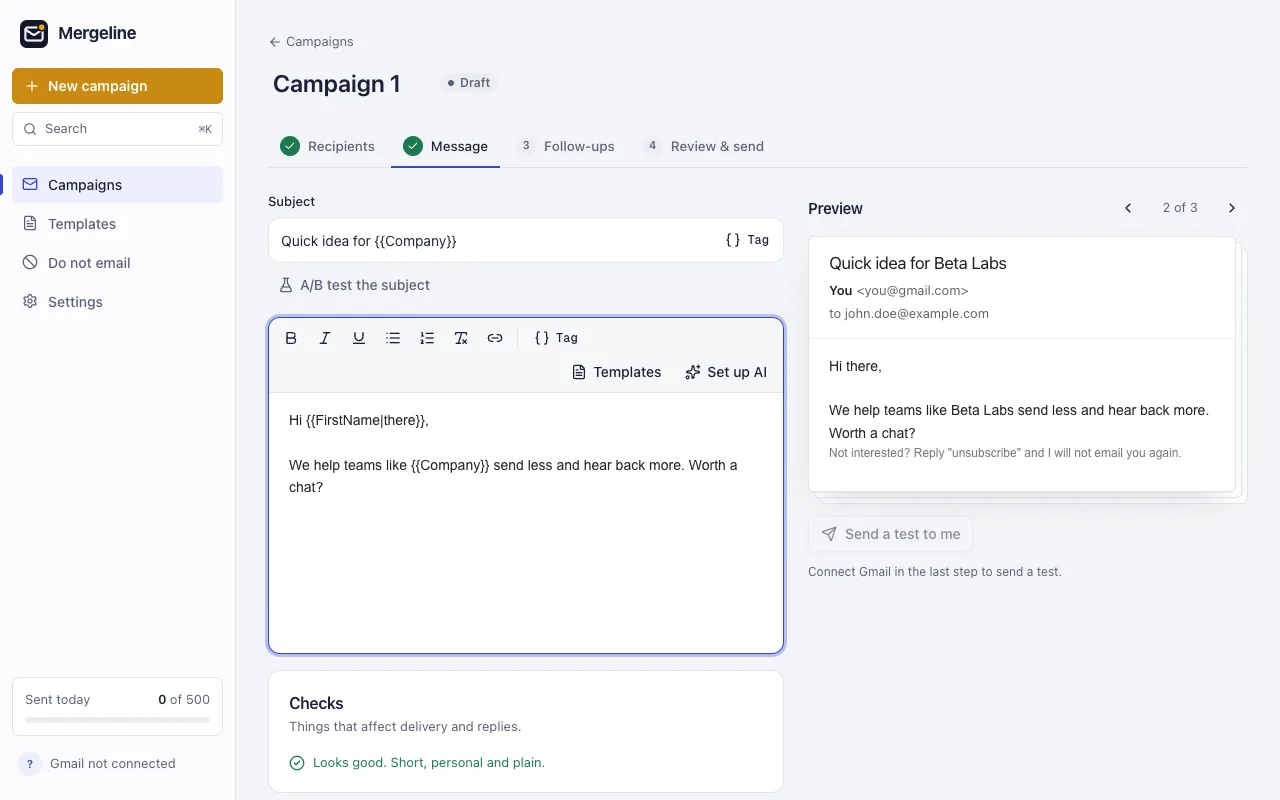
- Preview every family. Step through all of them, especially families with two children.
- Send or create drafts. Send directly, or with Pro create drafts to read and send from Gmail.
- Watch replies. Mergeline’s report shows which parents replied.
Read before you send
For anything about grades or behavior, review every email. Mergeline Pro’s drafts mode puts one personal draft per family into your Gmail Drafts folder. Read each one, fix anything odd, and send. On the free plan, use the live preview to step through every family before you press send.
School accounts and Google’s own tool
If your school pays for Google Workspace for Education Standard or Education Plus, Gmail’s built-in mail merge may be available (Google: Send personalized emails with mail merge in Gmail). It sends separate copies with fields from a sheet, but it adds an unsubscribe link and needs the sheet on its first tab.
Some schools limit Chrome extensions on school accounts. Ask your IT team before you install anything, and mention that Mergeline keeps lists in the browser and adds no tracking.
Email ideas for the school year
| When | Useful columns | |
|---|---|---|
| First week | Welcome and how to reach you | ParentName, Student |
| Before conferences | Time slot and what you will cover | Conference, Room |
| Mid-term | Missing work or a quick win | Missing, Praise |
| Before trips | Form reminder | Trip, FormDue |
| End of year | Thank you and summer ideas | Student, Highlight |
A Praise column is worth adding. A short note about something a child did well is the email parents forward to grandparents, and it makes the harder emails later in the year easier to send.
Questions
Is it OK to email from my personal Gmail?
Use your school account for school email when you can. It keeps records where your school expects them and follows its rules.
What if a parent replies with a question?
Replies come straight to your Gmail inbox, in that family’s own thread, so you can answer privately. The Mergeline report also shows which parents replied, so you can see at a glance who still needs a nudge before conferences.
Can I include grades in the email?
Only if your school allows it. Many schools prefer a parent portal for grades. Check your school’s rules before you put student data in an email or a sheet.
Can I Cc a co-teacher?
Yes, with Mergeline Pro. Add the co-teacher’s address in Cc, and each family’s email copies them.
How can a teacher email each parent individually?
Use mail merge with one row per family. Each parent gets their own email, and no addresses are shared.
Can I review the emails before they go?
Yes. Mergeline Pro creates personal drafts in Gmail for you to read and send. On Free, use the preview.
What about siblings with the same parent?
Merge them into one row with both names, so the parent gets one email that mentions both children.
Does it work with school Google accounts?
Mergeline works with Gmail and Workspace accounts, if your school allows Chrome extensions.
Is it free?
Yes, up to 60 emails a day, which covers most classes. Drafts mode is part of Pro.
Sources
- r/GoogleAppsScript: teacher automating parent emails
- r/Teachers: emailing a lot of parents efficiently
- r/GMail: mail merge needs duplicates to remain
- Google: Send personalized emails with mail merge in Gmail
Facts checked October 29, 2026. Google and other vendors change their limits and prices, so check the source before you rely on a number.
Mergeline does this from your own Gmail. Free for 60 emails a day with merge tags and no branding. Pro is $12 a month or $99 a year for follow-ups, scheduling and attachments.