 Mergeline
How to send individual emails to multiple recipients in Gmail without Bcc
Updated October 29, 2026
Use mail merge instead of Bcc. Mail merge sends each person a separate email addressed only to them, so nobody sees other addresses, each greeting can use their name, and replies stay private. Bcc hides addresses but sends one identical email, and one slip into the To field exposes the whole list.
Why Bcc is not the answer
Bcc was made for quietly copying someone. Using it to email a crowd works, but badly. Everyone gets the same message, so you open with “Hi all”. Your own address often sits in the To field, which looks odd. Spam filters see one message with many hidden recipients. And if you or a colleague pastes the list into To or Cc by mistake, every address is exposed.
That last risk is why people search for this. One forum post sums it up: “Everything is exactly the same except for the email ... not to BCC” (r/techsupport: email each person individually without Bcc).
Bcc and mail merge side by side
| Bcc | Mail merge | |
|---|---|---|
| What each person gets | One shared email | Their own separate email |
| Greeting | “Hi all” | “Hi Jane” |
| Other addresses visible? | Only if someone slips | Never, each email has one recipient |
| Replies | Can go to everyone if “reply all” and To are mixed up | Come back to you in separate threads |
| Follow-ups | Another group email | One per person, in their thread |
| Daily limit | Every Bcc address counts | Every email counts |
How to send individual copies with Mergeline
- Write a normal email. In Gmail, click Compose and add everyone to the To field, or start a Mergeline campaign for a longer list.
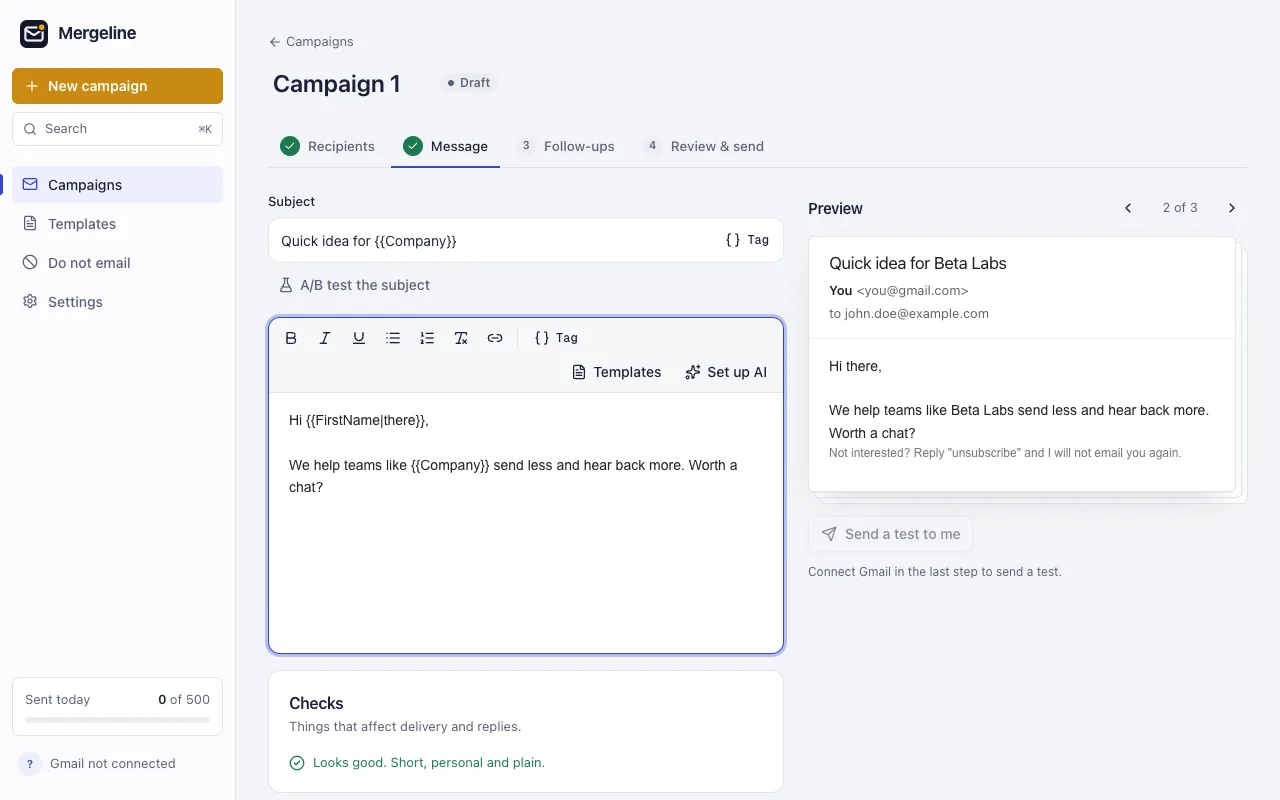
- Use their name. Start with “Hi {{FirstName|there}},”. If Mergeline has no first name for someone, it uses “there”.
- Press the Mergeline button. Click the Mergeline button next to Send. It splits the email into one copy per person.
- Check the preview. Look at two or three people to make sure the names and details are right.
- Send. Mergeline sends the copies one by one from your Gmail with short random gaps.
The manual way
For five or ten people you can do it by hand. Write the email, copy it, and send a fresh copy to each person with their name swapped in. A saved Gmail template can hold the text so you only paste it.
It works, but it is slow, and the mistakes are easy: the wrong name in the greeting, a missed person, a copy sent twice. Past about a dozen people, use a tool.
With Gmail’s built-in mail merge
If you have an eligible Workspace plan, the mail merge option in compose sends separate copies with fields like @firstname (Google: Send personalized emails with mail merge in Gmail). It also adds an unsubscribe link. For more, read Gmail’s built-in mail merge.
With Mergeline, from any Gmail account
Mergeline also adds a button next to Send in Gmail’s compose window. Write an email to several people as you normally would, press the Mergeline button instead of Send, and each person gets their own copy with their name filled in. For bigger lists, use a campaign with a sheet or a pasted list.
Each email shows up in your Sent folder like one you typed yourself. Mergeline adds no tracking pixel and no “sent with” line. Free sends up to 60 emails a day.
A note on daily limits
Separate emails still count against Gmail’s limit. A free account can send to about 500 people a day, and Workspace to 2,000 messages, of which 1,500 can be mail merge recipients (Google: Gmail sending limits, Google Workspace: Gmail sending limits). Read Gmail sending limits explained.
When Bcc is still fine
Bcc is not always wrong. For a quick note to a small group who all know each other’s role, like “the office is closed Friday” to your own team, Bcc or a plain group email is faster and nobody minds.
It stops being fine when people do not know each other, when privacy matters, or when you want answers. Clients, parents, donors, candidates and customers should never see each other’s addresses, and a mistake there can break privacy rules your organization follows. If you want replies, a personal greeting matters too: people answer emails addressed to them and skim emails addressed to “all”.
A simple rule: if you would be uncomfortable with one person seeing the list, or you hope each person will reply, send separate emails with mail merge.
Questions
Is there a Gmail setting that sends individual copies?
Not on free accounts. Eligible Workspace plans have the built-in mail merge. Otherwise you need an extension, an add-on or a script, or you send each copy by hand.
Can recipients see each other with mail merge?
No. Each email has exactly one person in the To field. There is nothing to see.
Is Bcc bad for deliverability?
One message to many hidden recipients looks like bulk mail to filters. Separate, personal emails look like normal one-to-one mail.
How do I send a mass email without showing addresses?
Use mail merge so each email has one recipient. Bcc also hides addresses, but one mistake in the To field shows them all.
Can I add a Cc to each email?
Gmail’s built-in merge allows one Cc or Bcc address, and none with a spreadsheet. Mergeline Pro supports Cc and Bcc, including tags like {{ManagerEmail}}.
Do replies go to everyone?
No. Each reply comes back only to you, in that person’s thread.
Sources
- r/techsupport: email each person individually without Bcc
- r/GMail: sending one message to multiple recipients
- Google: Send personalized emails with mail merge in Gmail
- Google: Gmail sending limits
- Google Workspace: Gmail sending limits
Facts checked October 29, 2026. Google and other vendors change their limits and prices, so check the source before you rely on a number.
Mergeline does this from your own Gmail. Free for 60 emails a day with merge tags and no branding. Pro is $12 a month or $99 a year for follow-ups, scheduling and attachments.