 Mergeline
How to avoid spam when sending bulk email from Gmail
Updated October 29, 2026
Email people who expect to hear from you, set up SPF and DKIM on your domain, keep your spam rate under 0.3% (Google targets under 0.1%), and send at a human pace with a slow start. Write short plain emails, skip tracking pixels and link shorteners, remove bad addresses, and stop emailing anyone who opts out.
Why bulk email from Gmail lands in spam
Gmail decides where your email goes by watching how people react to it, and by checking that your domain is set up correctly. The fastest way into spam is to send many similar emails to people who do not open, reply or recognize you, and some of whom click “Report spam”.
Mail merge itself is not the problem. Separate, personal emails look like normal one-to-one mail. The problems are the list, the pace and the content. One person asking about it put it simply: “a lot of emails go to spam” (r/GMail: keeping mail merge emails out of spam).
Google’s rules for senders
Google publishes sender guidelines that apply to everyone who emails Gmail users (Google: Email sender guidelines).
| Rule | Who it applies to |
|---|---|
| SPF or DKIM on your domain | All senders |
| Spam rate under 0.3%, ideally under 0.1% | All senders |
| SPF, DKIM and DMARC together | Senders of 5,000 or more emails a day to Gmail |
| One-click unsubscribe | Senders of 5,000 or more emails a day to Gmail |
If you send from a @gmail.com address, Google handles SPF and DKIM. If you send from your own domain on Workspace, turn on DKIM in the Admin console and add the SPF record your admin page shows.
Clean your list before every send
- Only email people who know you or have a clear reason to hear from you.
- Remove addresses that bounced last time. Repeated bounces are a strong spam signal.
- Fix typos like gmial.com and example.con before they bounce.
- Drop role addresses like info@ and noreply@ for personal outreach.
- Keep a do-not-email list and check it every time.
Send at a human pace
A person cannot send 400 emails in two minutes, and Gmail knows it. Space emails out with random gaps, set a daily cap well under Gmail’s limit, and grow slowly on a new or quiet account.
Account suspensions after a big merge are a common story (r/GMail: account suspended after mail merge). A new Workspace account is the most at risk: Google caps trial accounts at 500 a day (Google Workspace: Gmail sending limits), and YAMM recommends 100 a day or fewer for new accounts (YAMM pricing).
Write like a person
- Keep it short. Three to five sentences beats a newsletter layout.
- Use their name and one real detail, not just a name tag.
- One link at most, written out or on plain words. Skip link shorteners.
- No big images, no all-caps subject, no “free!!!” or “act now”.
- Ask one clear question so people reply. Replies are the best signal you can get.
- Add a plain line on how to opt out, like “Reply unsubscribe and I won’t email again.”
A safe first send, step by step
- Check your domain. If you use your own domain, confirm SPF and DKIM are set up in Google Workspace.
- Clean the list. Remove bounces, opt-outs and typos, and run an address check.
- Write a short email. Three to five sentences, their name and one real detail, one question.
- Send a test. Send it to yourself and to a friend on another provider, and see where it lands.
- Start small. Send to 20 to 50 people on day one, with random gaps between emails.
- Watch replies and bounces. If bounces pile up, stop and fix the list before you send more.
Skip tracking pixels
Open tracking adds a hidden image to every email. Practitioners report that Gmail can flag emails with tracking images, and many advise turning tracking off for cold email (r/coldemail: does open tracking harm deliverability?, The Growth List: cold email deliverability without open tracking). Open counts are also unreliable because Apple Mail Privacy Protection loads images automatically (Mailchimp: Apple Mail Privacy Protection FAQ). Read why open tracking pixels hurt deliverability and privacy.
What Mergeline does for you
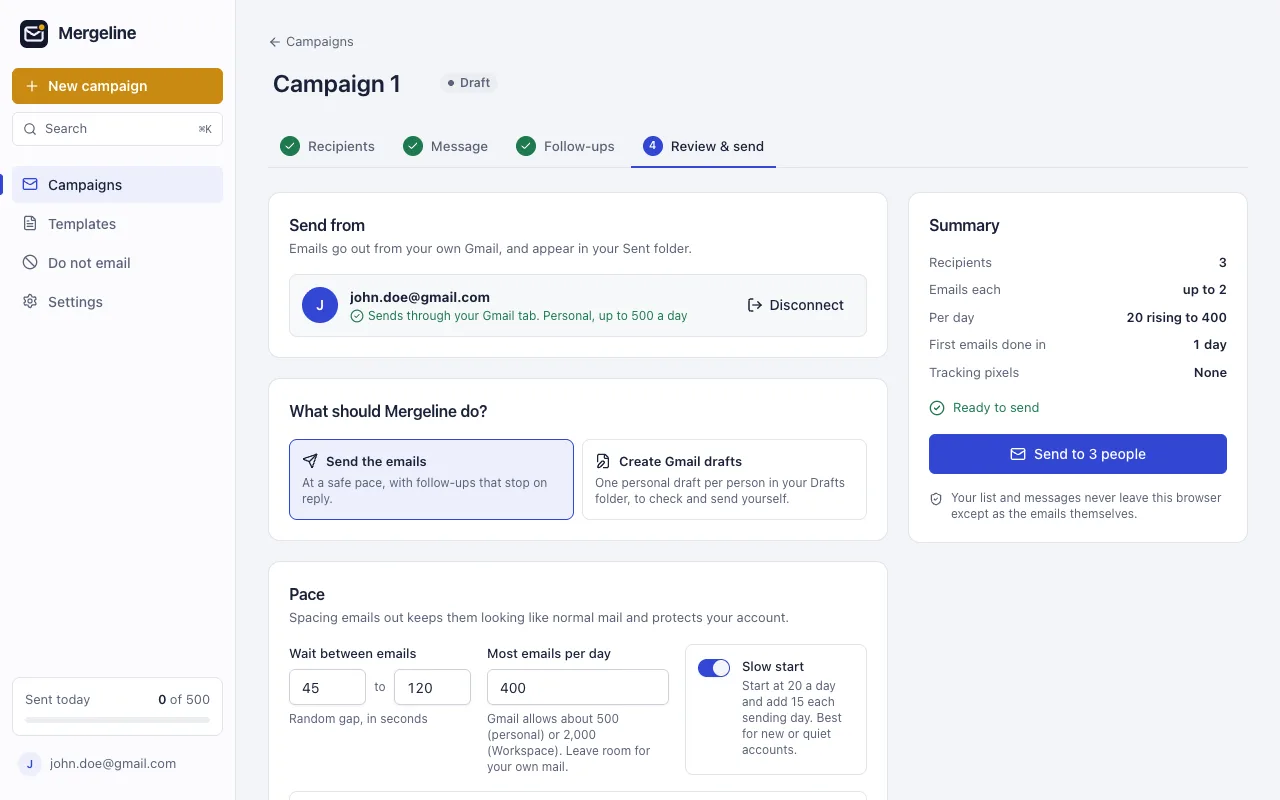
Mergeline adds no tracking pixels or link redirects. Before you send, it checks each email for missing merge tags, spam filter phrases, too many links and long subjects. It sends with random gaps and a daily cap, starts new accounts at 20 a day and adds 15 each sending day, and pauses on its own if too many emails bounce.
People who reply “unsubscribe” and addresses that bounce go on a do-not-email list and are never emailed again, across all campaigns.
Questions
Is a mail merge more likely to go to spam than a normal email?
Not by itself. Separate personal emails look like normal mail. A bad list, a fast burst or tracking pixels are what hurt.
How many emails can I send at once without being marked as spam?
Google gives no safe number. Send in small batches with gaps, stay well under the daily limit, and grow slowly on a new account.
Do I need DMARC?
Google requires SPF, DKIM and DMARC for senders of 5,000 or more emails a day to Gmail. Below that, SPF or DKIM is required, and DMARC is still a good idea.
Should I include an unsubscribe link?
Bulk senders over 5,000 a day need one-click unsubscribe. For smaller personal sends, a plain “reply unsubscribe” line works and keeps the email personal.
Can my Gmail account get suspended?
Yes, if you send too fast, hit limits often or get many spam reports. Pace your sends and email people who expect you.
Sources
- Google: Email sender guidelines
- Google Workspace: Gmail sending limits
- YAMM pricing
- Mailchimp: Apple Mail Privacy Protection FAQ
- r/coldemail: does open tracking harm deliverability?
- The Growth List: cold email deliverability without open tracking
- r/GMail: keeping mail merge emails out of spam
- r/gsuite: bulk business emails and spam
- r/GMail: account suspended after mail merge
Facts checked October 29, 2026. Google and other vendors change their limits and prices, so check the source before you rely on a number.
Mergeline does this from your own Gmail. Free for 60 emails a day with merge tags and no branding. Pro is $12 a month or $99 a year for follow-ups, scheduling and attachments.