 Mergeline
Gmail sending limits explained
Updated October 29, 2026
A free Gmail account can send to 500 recipients a day. Google Workspace allows 2,000 messages a day per user, of which 1,500 can go to mail merge recipients, and only 500 during a trial. Go over and Gmail blocks sending for 1 to 24 hours. Limits are rolling, not reset at midnight.
The numbers, from Google
| Account | Daily limit | Other limits |
|---|---|---|
| Free Gmail | 500 recipients a day | Also 500 recipients in a single email |
| Google Workspace | 2,000 messages a day per user | 10,000 total recipients a day, 3,000 external recipients a day |
| Workspace mail merge | 1,500 mail merge recipients a day | The last 500 of the 2,000 are kept for normal email |
| Workspace trial | 500 messages a day | 500 unique external recipients |
Sources: Google: Gmail sending limits, Google Workspace: Gmail sending limits and Google: Send personalized emails with mail merge in Gmail, checked October 29, 2026. Workspace also counts unique recipients: 3,000 a day, of which 2,000 can be external. Limits rise once your domain has paid Google $100 in total.
How the limits really work
Three details cause most of the confusion, and the forums are full of it: “There is a lot of confusing stuff out regarding the daily sending limit” (r/gsuite: how many emails can I send per day?).
- It counts recipients, not clicks on Send. One email to 10 people uses 10. Cc and Bcc addresses count too.
- It is a rolling 24 hours. There is no midnight reset. Emails sent at 3pm yesterday free up around 3pm today.
- Workspace counts more than one thing. You can stay under 2,000 messages and still hit the 3,000 external recipients or unique recipients limit.
Some tools spell out the Cc point. Digital Inspiration’s docs say its quota counts every To, Cc and Bcc recipient (Digital Inspiration: mail merge email quota).
What happens when you hit the limit
Gmail shows “You have reached a limit for sending mail” and stops sending for a while, usually between 1 and 24 hours (Google: Gmail sending limits). You can still read and receive email. Emails that were not sent bounce back to you or wait in Outbox, depending on how you sent them.
Hitting the limit once is not a disaster, but doing it often, or sending a burst that gets reported as spam, can lead Google to suspend sending on the account. People post about this after mass sends: “my account was suspended. I had just paid for this account” (r/GMail: account suspended after mail merge).
Can you raise the limit?
Not on a free account. On Workspace, the limits grow as your account ages and after your domain has paid $100 in total. Trial accounts are capped at 500 until the trial ends (Google Workspace: Gmail sending limits).
Some tools advertise “unlimited” sending by routing mail through other servers. That moves your email off Gmail and adds a company to the chain. If you need more than Gmail allows every day, you are probably sending newsletters, and a service built for that is the better fit. See mail merge vs Mailchimp.
Plan your sends around the limit
Real people send more than mail merges. Leave room for your normal email, and spread big lists over several days.
- Free Gmail: plan for 300 to 400 merge emails a day at most.
- New Workspace or trial account: start small. YAMM recommends 100 a day or fewer for new accounts (YAMM pricing).
- Established Workspace account: up to 1,500 merge recipients, minus anything you Cc.
- Follow-ups count. A campaign with two follow-ups can use up to three emails per person.
How Mergeline keeps you under the limit
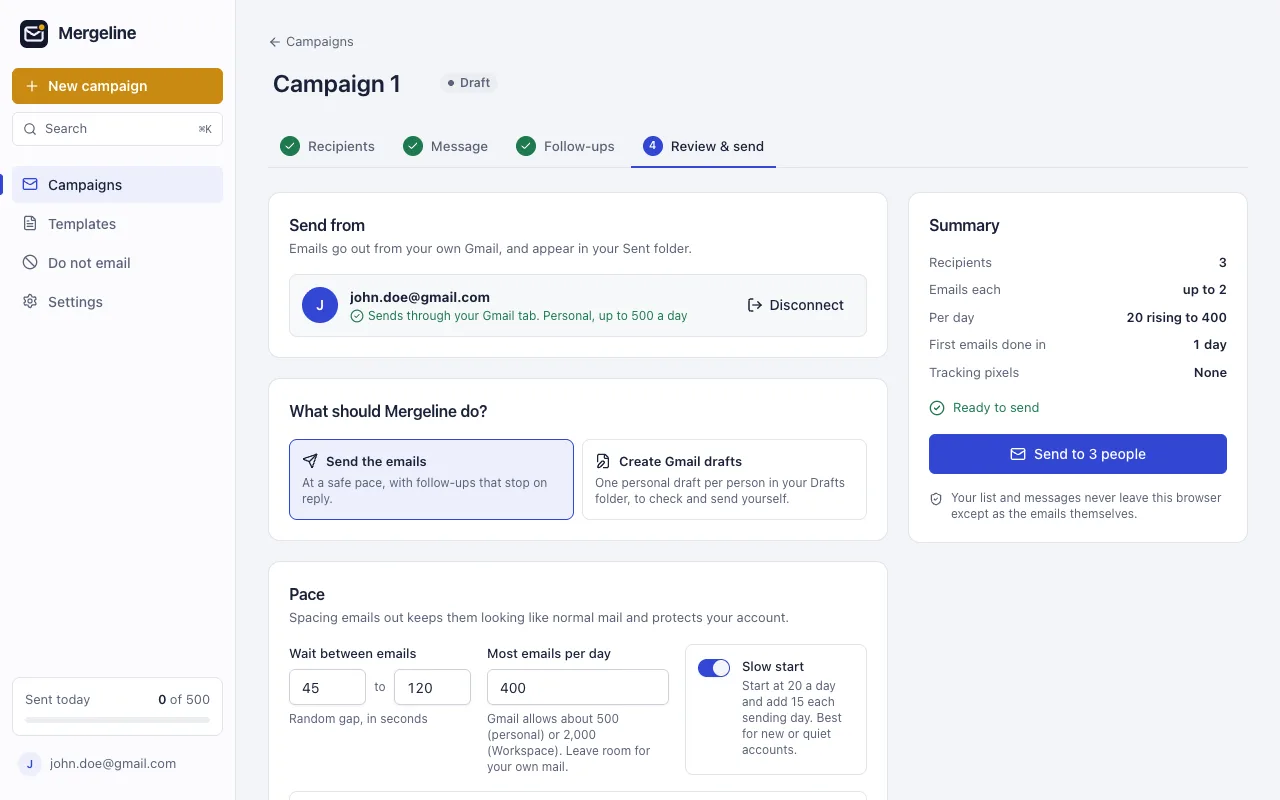
Mergeline counts what you send each day and stops before Gmail’s limit. Free sends up to 60 emails a day. Pro sends up to Gmail’s own limit, and you choose a lower daily cap if you like. Pro is $12 a month or $99 a year.
Slow start begins a new or quiet account at 20 emails a day and adds 15 each sending day. Random gaps space emails out, so a list never leaves in one burst. If the daily limit is reached, Mergeline pauses, tells you, and carries on the next day.
Myths about Gmail limits
- “Workspace lets me send 2,000 mail merge emails.” Not with Google’s built-in tool: it stops at 1,500 so you keep room for normal email.
- “The limit resets at midnight.” It is a rolling window, so a big send at 4pm blocks you until about 4pm the next day.
- “Bcc does not count.” Every recipient counts, wherever you put them.
- “Paying for an extension raises my limit.” Tools that send through your Gmail are bound by Gmail’s limit. Only tools that route mail through other servers go past it.
- “A trial account is the same as a paid one.” Trials are capped at 500 messages a day until you pay.
Questions
How many emails can I send per day from Gmail?
About 500 recipients a day from a free Gmail account, and 2,000 messages a day from Google Workspace (500 during a trial).
What is the Gmail mail merge daily limit?
Google’s built-in mail merge allows up to 1,500 recipients a day on eligible Workspace plans. The last 500 of your 2,000 messages are kept for normal email.
Do Cc and Bcc count toward the limit?
Yes. Gmail counts recipients, so every To, Cc and Bcc address counts.
When does the Gmail limit reset?
It is a rolling 24 hour window. Google says sending usually comes back within 1 to 24 hours.
Is there a per hour limit?
Google’s pages list daily limits. Sending in fast bursts still looks like bulk mail, so space emails out.
Sources
- Google: Gmail sending limits
- Google Workspace: Gmail sending limits
- Google: Send personalized emails with mail merge in Gmail
- Digital Inspiration: mail merge email quota
- YAMM pricing
- r/gsuite: how many emails can I send per day?
- r/GMail: account suspended after mail merge
Facts checked October 29, 2026. Google and other vendors change their limits and prices, so check the source before you rely on a number.
Mergeline does this from your own Gmail. Free for 60 emails a day with merge tags and no branding. Pro is $12 a month or $99 a year for follow-ups, scheduling and attachments.