 Mergeline
How to send cold email from Gmail safely
Updated October 29, 2026
Send cold email from Gmail in small, personal batches: research each person, write three to five sentences, add one or two follow-ups that stop on reply, and stay far under Google’s limits (Workspace allows 3,000 external recipients a day, 500 on a trial). Warm up new accounts slowly and skip open tracking.
Is cold email from Gmail allowed?
Gmail is built for person-to-person email, and a short, relevant note to a stranger is still person-to-person. What Google pushes back on is volume and complaints: senders must keep their spam rate under 0.3% (Google: Email sender guidelines). Laws like CAN-SPAM and GDPR also apply to your emails, so know the rules where you and your recipients are.
Small teams often pick Gmail because the big cold email platforms feel built for agencies: “Instantly and smartlead are mostly catering marketing agencies” (r/coldemail: Instantly and Smartlead are mainly for agencies).
The limits that matter for cold email
| Account | Limit for cold email | Source |
|---|---|---|
| Free Gmail | 500 recipients a day in total | Google: Gmail sending limits |
| Workspace | 3,000 external recipients a day, 2,000 unique external | Google Workspace: Gmail sending limits |
| Workspace trial | 500 unique external recipients | Google Workspace: Gmail sending limits |
Those are ceilings, not targets. A new account that sends hundreds of cold emails in its first week is the classic suspension story. Plan for a small fraction of the limit, and grow only when replies come in and bounces stay low.
Build a list you can defend
- Pick people with a clear reason to care: their role, their company’s news, a shared problem.
- Verify addresses before you send. Bounces hurt fast on cold lists.
- Use a real column for the reason you are writing, not just FirstName.
- Never buy lists, and never email someone who already said no.
Write an email that gets replies
A cold email that works reads like one person wrote it for one person. Here is a pattern that keeps it short.
- A first line about them: {{Reason}}, written by you for each row.
- One sentence on what you do, in their terms.
- One small question they can answer in a line.
- Your name. No logo, no signature banner, no tracking.
Use conditional text for small differences. {{#if Company}}I saw {{Company}} is hiring.{{else}}I saw your post.{{/if}} reads naturally either way. See merge tags, fallbacks and conditional text.
A safe cold email routine in Gmail
- Set up the domain. Use a Workspace account on your domain with SPF and DKIM turned on.
- Research 20 people. Find a real reason to write to each, and put it in a column.
- Write and preview. Three to five sentences with their reason up front. Preview every email.
- Send slowly. Start at about 20 a day with random gaps, inside business hours.
- Follow up once or twice. Three to five days apart, in the same thread, stopping on reply.
- Review weekly. Grow only if replies come in and bounces stay near zero.
Follow up, but stop on reply
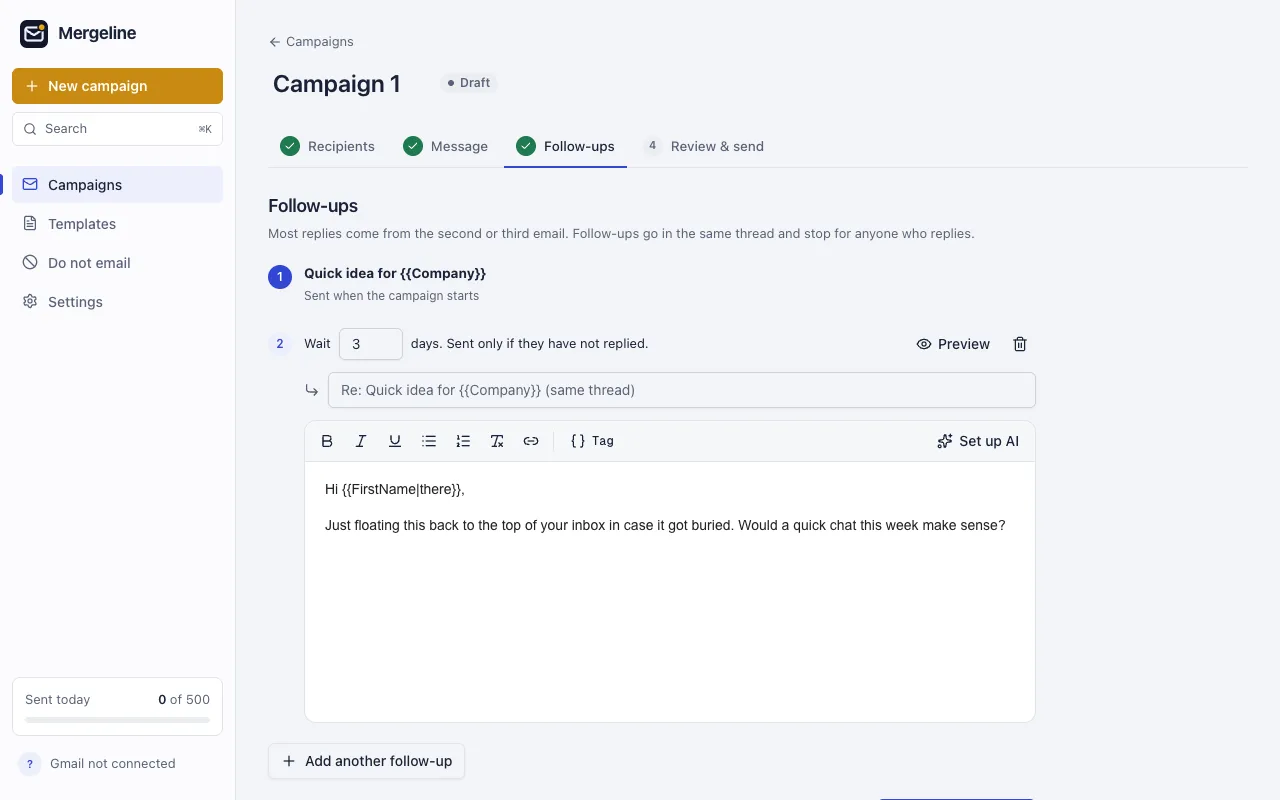
Most replies come after a follow-up, so plan one or two. Send them in the same thread a few days apart, and make sure they stop the moment someone answers. Nothing burns trust faster than “just bumping this” after a person already replied. Read follow-up emails that stop on reply.
Doing it with Mergeline
Mergeline sends cold email from your own Gmail with random gaps, a daily cap, a slow start of 20 a day plus 15 each sending day, and sending hours in each person’s time zone. Pro adds up to 7 follow-ups that stop on reply, and an AI first line per person using your own AI key. It adds no tracking pixels, and stops automatically if bounces pile up.
Free sends 60 a day, which suits a careful cold email routine. Pro is $12 a month or $99 a year. For price comparisons with GMass and others, see mail merge pricing and alternatives.
Mistakes that get cold emailers in trouble
- Sending hundreds of emails on the first day from a new account or domain.
- Using a bought or scraped list full of old and fake addresses.
- Long emails with images, several links and a tracking pixel.
- Following up with people who already replied or asked to stop.
- Ignoring bounces until the account is blocked.
- Sending the exact same sentence to everyone, which reads as automated.
Every item on that list is a choice. Slow down, write less, listen to the signals, and Gmail treats your cold email like the person-to-person email it should be.
Questions
Can I cold email from a Google Workspace account without getting banned?
Yes, if you stay small and relevant: verified addresses, personal emails, slow growth, and a spam rate well under 0.3%.
How many cold emails can I send a day from Gmail?
Google’s ceiling for Workspace is 3,000 external recipients a day, 500 on a trial. A safe cold routine is a small fraction of that.
Should I use a separate domain for cold email?
Many teams do, so problems do not touch their main domain. If you do, warm it up slowly like any new account.
Can I cold email for free?
Yes. A Gmail account plus a free tool works. Mergeline Free sends 60 a day with merge tags and reply detection.
Do I need open tracking for cold email?
No. Opens are unreliable, and many cold emailers turn tracking off. Count replies instead.
Sources
- Google: Email sender guidelines
- Google: Gmail sending limits
- Google Workspace: Gmail sending limits
- r/coldemail: how to send bulk emails from Gmail
- r/coldemail: cold emailing with $0
- r/googleworkspace: tool for mass mailing from Gmail
- r/coldemail: warning for GMass users on Workspace
Facts checked October 29, 2026. Google and other vendors change their limits and prices, so check the source before you rely on a number.
Mergeline does this from your own Gmail. Free for 60 emails a day with merge tags and no branding. Pro is $12 a month or $99 a year for follow-ups, scheduling and attachments.