 Mergeline
How to send follow-up emails in Gmail that stop on reply
Updated October 29, 2026
Gmail cannot send automatic follow-ups on its own, and its built-in mail merge has none. Use a tool that sends each follow-up in the same thread after the days you choose and skips anyone who replied. Mergeline Pro adds up to 7 follow-ups per campaign and checks for replies, bounces and opt-outs before each one.
Why follow-ups matter
People miss emails. They read yours on a phone, mean to answer later and forget. A short follow-up a few days later often gets the reply the first email did not.
The catch is that a follow-up to someone who already replied looks careless. That is the whole requirement people ask for: “The sequence should stop if the person responds” (r/GMail: auto follow-up tools for Gmail).
What Gmail can and cannot do
Gmail has no automatic follow-up feature. Its built-in mail merge cannot be used with reply or forward and has no follow-up step (Google: Send personalized emails with mail merge in Gmail). Doing it by hand means searching your Sent folder, checking who answered, and replying to the rest one by one. That is fine for five people and painful for fifty.
Add-ons and extensions fill the gap, often on higher plans. GMass includes follow-ups from its Premium plan, and Mailmeteor from Premium (5 follow-ups) and Professional (10) (GMass pricing, Mailmeteor pricing). People ask for a free version often (r/Emailmarketing: free mail merge follow-up).
How “stop on reply” works
A tool that stops on reply has to check your inbox before each follow-up. Here is what a good one checks.
- Replies. Any email from that person after your first one.
- Opt-outs. A reply that says “unsubscribe” or “remove me” ends the sequence and adds them to a do-not-email list.
- Bounces. An address that bounced gets no follow-ups.
- Out of office. Worth a look by you, since an auto-reply is not a real answer.
Mergeline checks your Gmail for replies about every 10 minutes while your browser is open.
Timing that works
| Follow-up | When | What to say |
|---|---|---|
| 1 | 3 days after the first email | One line that adds something: a date, a link, a simpler question |
| 2 | 4 to 7 days later | A different angle or a short example |
| 3 | 1 to 2 weeks later | A polite close: “Should I stop writing about this?” |
Two or three is plenty for most lists. Mergeline allows up to 7 for long processes like event reminders, not so you can send seven nudges.
How to set up follow-ups in Mergeline
- Write the first email. Build your campaign as usual: list, message and preview.
- Open the Follow-ups step. Click Add follow-up.
- Pick the wait. Choose how many days after the previous email it should go, for example 3.
- Write it short. One or two lines that add something new. Tags work here too.
- Add more if needed. Add a second or third the same way, up to 7.
- Send. Press send. Follow-ups go out on schedule while your browser is open, and stop for anyone who replies.
What to write
- Keep it shorter than the first email.
- Add one new piece of information, never only “bumping this”.
- Send it in the same thread, so the first email sits right below.
- Make the reply easy: a yes or no question works best.
- End the sequence gracefully. A last email that lets them off the hook often gets a reply.
Follow-ups in Mergeline
In the Follow-ups step, add a follow-up, pick how many days to wait, and write it. Each one goes in the same conversation as the first email, only to people who have not replied, opted out or bounced. Merge tags and fallbacks work in follow-ups too. Follow-ups are part of Pro: Pro is $12 a month or $99 a year.
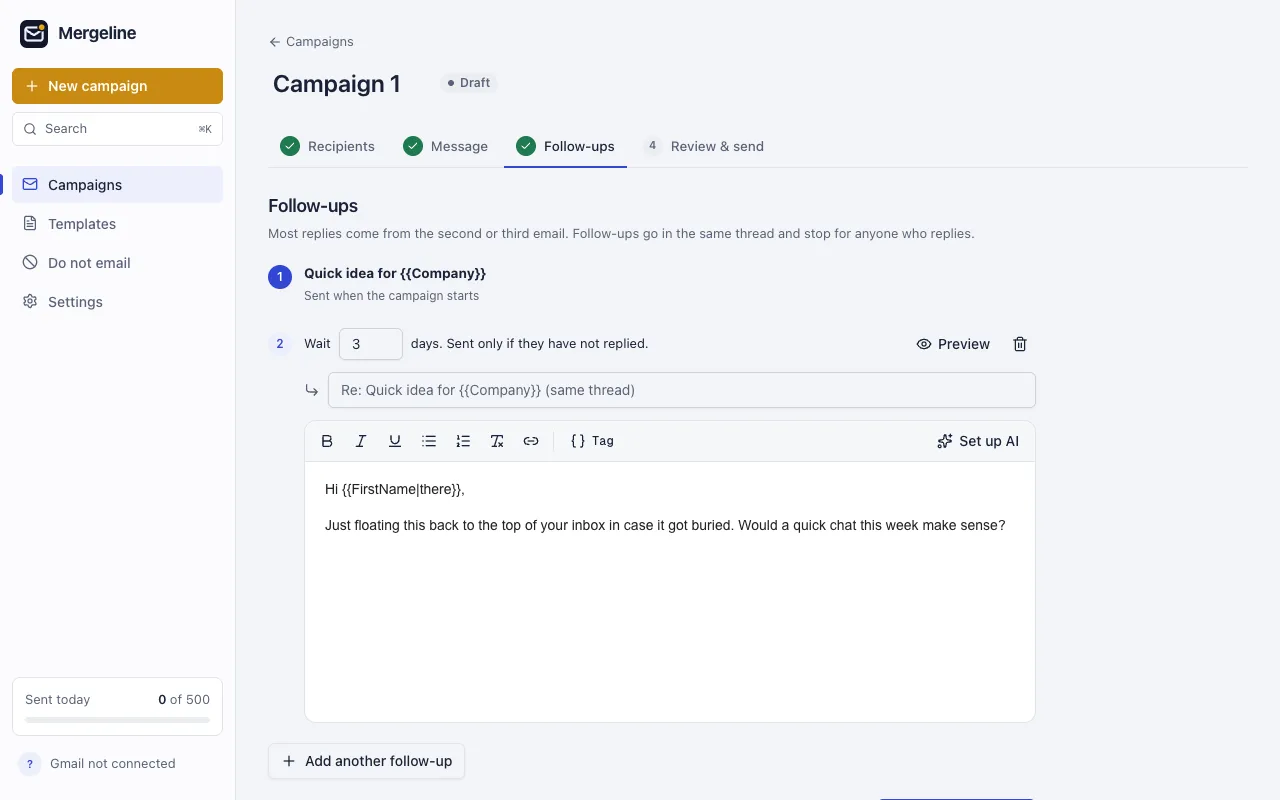
An example follow-up sequence
Here is a short sequence for an event invitation. Each email adds something new, and each is shorter than the one before.
- First email. “Hi {{FirstName|there}}, we are hosting a small breakfast for local founders on May 3. Would you like a seat?”
- After 3 days. “Quick add: Sam Lee from Beta Labs is speaking about hiring a first engineer. Still interested?”
- After 5 more days. “Last call for seats. Reply yes and I will save you one.”
Anyone who replies at step one never sees steps two or three. Anyone who replies “unsubscribe” is added to the do-not-email list.
Questions
Can a follow-up have its own subject?
Yes. In Mergeline you can give a follow-up its own subject, or leave it blank to keep the first email’s subject. Leaving it blank keeps the conversation tidy in the recipient’s inbox.
What if someone replies to a follow-up?
The rest of the sequence stops for that person, just as if they had replied to the first email.
Does Gmail have automatic follow-ups?
No. Gmail and its built-in mail merge do not send follow-ups. You need a tool or a manual routine.
How do I follow up only with people who did not reply?
Use a tool that checks for replies before each follow-up. Mergeline skips anyone who replied, opted out or bounced.
Is there a free follow-up tool for Gmail that stops on reply?
Few free plans include follow-ups. In Mergeline they are part of Pro; the free plan includes reply detection but not follow-ups.
Are follow-ups sent in the same thread?
In Mergeline, yes. Each follow-up appears in the same conversation as the first email.
Does my browser need to be open?
Yes. Mergeline sends from your browser. If it was closed, due follow-ups go out when you open it again.
Sources
- Google: Send personalized emails with mail merge in Gmail
- GMass pricing
- Mailmeteor pricing
- r/GMail: auto follow-up tools for Gmail
- r/Emailmarketing: mail merge with automatic follow-up
- r/Emailmarketing: free mail merge follow-up
Facts checked October 29, 2026. Google and other vendors change their limits and prices, so check the source before you rely on a number.
Mergeline does this from your own Gmail. Free for 60 emails a day with merge tags and no branding. Pro is $12 a month or $99 a year for follow-ups, scheduling and attachments.