 Mergeline
Why open tracking pixels hurt deliverability and privacy
Updated October 29, 2026
An open tracking pixel is a tiny hidden image that tells the sender when it loads. Apple Mail Privacy Protection loads these images automatically, so open rates are inflated and unreliable. Practitioners also report that tracking images can trigger Gmail warnings and spam reports. Track replies instead: they are accurate and they are what you want.
How a tracking pixel works
When a tool “tracks opens”, it adds a 1 by 1 pixel image to the bottom of your email. The image has a unique address for each person. When their email app downloads the image, the tool’s server logs that person as having opened the email, along with the time and often the device.
That is the whole trick. It does not know whether the person read anything. It only knows that something downloaded an image.
Why open rates are not accurate
Apple Mail Privacy Protection downloads remote images in the background, whether or not the person opens the email. Mailchimp says open metrics are not reliable for people who use it (Mailchimp: Apple Mail Privacy Protection FAQ). Twilio’s notes on Apple say the same about inflated opens (Twilio: Apple inbox provider insights).
Other mail apps block images by default, so real opens go uncounted. Between the two, an open rate is a rough guess at best. Cold emailers say it bluntly: “open tracking is not accurate anyway” (r/coldemail: why some say don’t track open rates).
How pixels can hurt deliverability
This part is reported by practitioners, not stated by Google, so treat it as field experience. Senders report that Gmail can show a banner on emails with tracking images, which makes a spam report one click away, and that turning tracking off improved their inbox placement (r/coldemail: does open tracking harm deliverability?, r/coldemail: does a tracking pixel worsen inbox placement?, The Growth List: cold email deliverability without open tracking). One reply sums up the worry: “That mark as spam option is what kills deliverability.”
There is also a structural point. Most tools serve the pixel from a shared tracking domain, so your email carries a link to a domain used by many other senders. If some of them send spam, that domain’s reputation is not yours to control.
Even tools that track by default let you turn it off. lemlist has a help page for disabling tracking (lemlist help: disable email tracking).
The privacy side
A pixel tells the sender when you read their email, how many times and roughly on what device, without asking. Many people find that intrusive, which is exactly why Apple built a feature to defeat it.
For you as the sender, it also means another company receives a record every time one of your contacts opens an email. GMass, for example, says email content passes through its server to insert tracking, and it stores recipient addresses for tracking and unsubscribes (GMass: what data our server stores).
What to measure instead
| Signal | Accurate? | What it tells you |
|---|---|---|
| Opens | No, inflated by Apple and blocked by others | Little |
| Clicks | Mostly, but needs link redirects | Interest in one link |
| Replies | Yes | A real conversation started |
| Bounces | Yes | Which addresses are bad |
| Opt-outs | Yes | Who to stop emailing |
For a personal mail merge, replies are the goal anyway. A subject line test judged by replies tells you more than one judged by opens.
How Mergeline handles tracking
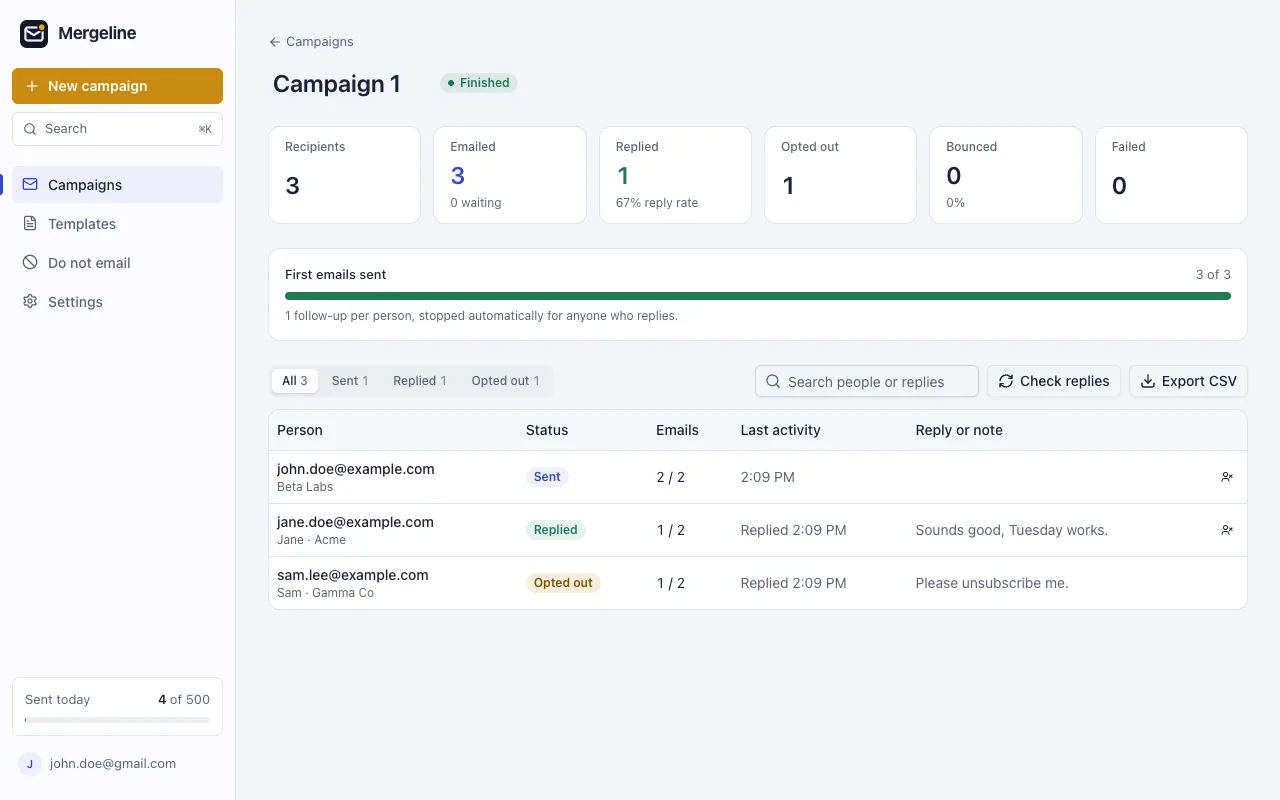
Mergeline adds no tracking pixels and no link redirects, ever. Your links go straight to where you point them. Instead, it checks your Gmail for replies, bounces and opt-outs, and shows them in the report. Follow-ups stop for anyone who replies.
Subject A/B tests in Mergeline Pro pick the winner by reply rate, not opens. Read how to A/B test subject lines.
If you still want a sign of interest
Some people want to know who is warm before a follow-up. You can get most of that without a pixel.
- Ask a question that is easy to answer in one line. A reply is the clearest sign of interest there is.
- Use a link to something useful, like a calendar or a short page, and look at your own site’s visits or bookings.
- Watch for out-of-office replies and bounces, which tell you who did not see the email at all.
- Follow up with everyone who did not reply, not just those who “opened”. Since open data is unreliable, that is the fair way to do it.
These signals take a little more thought than an open rate, but every one of them is real.
Questions
Does Mergeline show open rates?
No. Mergeline adds no tracking pixels, so it has no open data to show. Its report shows sent, replied, opted out, bounced and failed for each person, which are all exact.
How do I track if an email was opened in Gmail?
Gmail has no built-in open tracking. Tools add a hidden image to do it, but Apple Mail Privacy Protection makes the results unreliable.
Do tracking pixels hurt deliverability?
Google has not said so directly. Practitioners report better inbox placement after turning tracking off, and some report Gmail warning banners on tracked emails.
Should I turn off open tracking for cold email?
Many cold emailers do, and track replies instead. You lose an inaccurate number and remove a possible spam signal.
Does Gmail’s built-in mail merge track opens?
Google’s help page for mail merge does not mention open tracking.
Why is my open rate over 100% or suspiciously high?
Apple Mail Privacy Protection and some security scanners load images automatically, counting opens that never happened.
Sources
- Mailchimp: Apple Mail Privacy Protection FAQ
- Twilio: Apple inbox provider insights
- r/coldemail: does open tracking harm deliverability?
- r/coldemail: does a tracking pixel worsen inbox placement?
- r/coldemail: why some say don’t track open rates
- The Growth List: cold email deliverability without open tracking
- lemlist help: disable email tracking
- GMass: what data our server stores
- Google: Send personalized emails with mail merge in Gmail
Facts checked October 29, 2026. Google and other vendors change their limits and prices, so check the source before you rely on a number.
Mergeline does this from your own Gmail. Free for 60 emails a day with merge tags and no branding. Pro is $12 a month or $99 a year for follow-ups, scheduling and attachments.